Selecting, fast-forwarding and reversing tracks/files/songs
In this manual: Interior features
~1min read
■ Selecting a track/file/song
Press the “∧” or “∨” button on “SEEK/TRACK” or turn the “TUNE/ SCROLL” knob to select the desired track/file/song number.
To fast-forward or reverse, press and hold the “∧” or “∨” button on “SEEK/TRACK”.
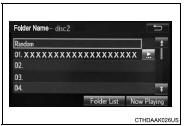
■ Selecting a track/file/song from the track/file/song list 1 Select “Browse” or cover art.
2 Select the desired track/file/ song.
When an MP3/WMA/AAC disc or USB memory device is being used, the folder can be selected. When a Bluetooth® device or iPod is being used, the album can be selected.
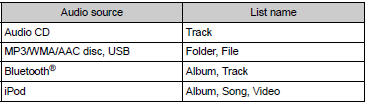
According to the audio device, the following is displayed.
?
Test yourself
A quick Toyota Corolla quiz: every answer comes with an explanation and a link to the manual page.