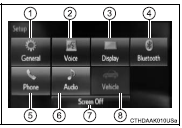
You can adjust the multimedia system to your desired settings.Display “Setup” screen
Press the “SETUP” button to display the “Setup” screen.
1 Select to adjust the settings for operation sounds, screen animation, etc. 2 Select to set the voice settings.
3 Select to adjust the settings for contrast and brightness of the screen. 4 Select to adjust the settings for registering, removing, connecting and disconnecting Bluetooth® devices. 5 Select to adjust the settings for phone sound, contact, etc.
6 Select to set audio settings. 7 Select to turn the screen off.
8 Select to set the vehicle custmization
?
Test yourself
A quick Toyota Corolla quiz: every answer comes with an explanation and a link to the manual page.