Vehicle information
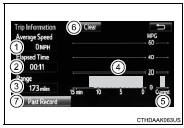
Press “CAR” to display the “Trip Information” or “Past Record” screen.
Fuel consumption ■ Trip informationIf the “Trip Information” screen does not appear, select “Trip Information”.
1 Average vehicle speed 2 Elapsed time
3 Range
4 Previous fuel consumption per minute 5 Current fuel consumption 6 Reset the trip information data 7 “Past Record” screen appears
These images are examples only, and may vary slightly from actual conditions.
If the “Past Record” screen does not appear, select “Past Record”.
1 Previous fuel economy record 2 Current fuel economy
3 Best recorded fuel economy 4 Update the past record data 5 Reset the past record data 6 “Trip Information” screen appears 7 Average recorded fuel economy
These images are examples only, and may vary slightly from actual conditions.
■Resetting the dataSelecting “Clear” on the consumption screen will reset the consumption data.
Selecting “Clear” on the “Past Record” screen will reset the past record data.
■Updating the past record dataSelecting “Update” on the “Past Record” screen will update the past record data.
Test yourself
A quick Toyota Corolla quiz: every answer comes with an explanation and a link to the manual page.