Audio system
Audio settings
In this manual: Audio system
9steps
~54min
2/5difficulty
Done 0 of 9
Settings are available for adjusting the radio operation, cover art, etc.
Screen for audio settings- Press the “setup” button.
- Select “audio” on the “setup” screen.
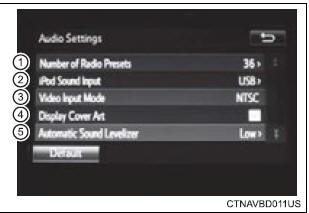
- Number of radio presets select the number of radio preset stations.
- Select input video sound.
- Select video signal.
- Display cover art on/off
- Automatic sound levelizer
- Select “automatic sound levelizer”.
- Select “high”, “mid”, “low” or “off”.
Asl automatically adjusts the volume and tone quality according to the vehicle speed.
Was this page helpful?