Audio system

Setup menu

2steps
~12min
1/5difficulty
Done 0 of 2

You can adjust the audio system to your desired settings.

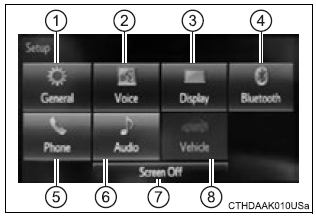
Display “setup” screen

Press the "setup" button to display the "setup" screen.

  1. Select to adjust the settings for operation sounds, screen animation, etc.
  2. Select to set the voice settings.
  • Select to adjust the settings for contrast and brightness of the screen.
  • Select to adjust the settings for registering, removing, connecting and disconnecting bluetoothr devices.
  • Select to adjust the settings for phone sound, contact, message, etc.
  • Select to set audio settings.
  • Select to turn the screen off.
  • Select to set the vehicle custmization.
  • Toyota Highlander. Display setup screen