Audio system
Aux port/usb port
In this manual: Audio system
~1min read
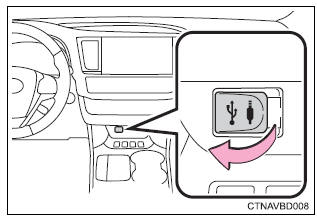
Connect an ipod, usb memory device or portable audio player to the aux port/usb port as indicated below. Select “ipod”, “usb”, “aux” or “a/v” on the audio source selection screen and the device can be operated via audio system.
Connecting using the aux port/usb port iPodOpen the cover and connect an ipod using an ipod cable.
Turn on the power of the ipod if it is not turned on.
Usb memory
Open the cover and connect the usb memory device.
Turn on the power of the usb memory device if it is not turned on.
Portable audio playerOpen the cover and connect the portable audio player.
Turn on the power of the portable audio player if it is not turned on.
 Warning
While driving
Do not connect a device or operate the device controls.
Was this page helpful?