Connecting a bluetooth® device
Up to 5 bluetooth® devices (phones [hfp] and audio players [avp]) can be registered.
If more than 1 bluetooth® device has been registered, select which device to connect to.
- Press the “setup” button.
- Select “bluetooth*”.
Supported profile icons will be displayed.
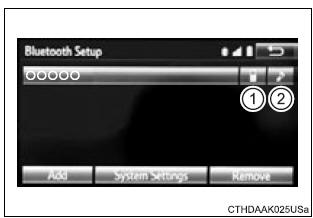
- Phone
- Audio player
Supported profile icons for currently connected devices will illuminate.
Dimmed icons can be selected to connect to the function directly.
Auto connectionTo turn auto connection mode on, set "bluetooth* power" to on.
When you register a phone, auto connection will be activated. Always set it to this mode and leave the bluetoothr phone in a place where a connection can be established.
When the audio system is turned to on, the system will search for a nearby cellular phone you have registered.
Next, the system automatically connects with the most recent of the phones connected to in the past. Then, the connection result is displayed.
*: Bluetooth is a registered trademark of bluetooth sig, inc.
Manual connectionWhen auto connection has failed or "bluetooth* power" is turned off, you must connect the bluetoothr device manually.
*: Bluetooth is a registered trademark of bluetooth sig, inc.
- Follow the steps in "connecting a bluetoothr device" from "step 1".
- Registering an additional device
- select "select device" on the bluetoothr audio control screen.
- For more information:
- selecting a registered device
- select "select device" on the bluetoothr audio control screen.
- For more information:
If the system cannot connect due to poor signal strength, the system will automatically attempt to reconnect.
If the phone is turned off, the system will not attempt to reconnect. In this case, the connection must be made manually, or the phone must be reselected.