Past record
- Audio system with “apps” button
- Press the “apps” button.
- Touch “eco” on the “apps” screen.
If the “trip information” screen is displayed, select “past record”.
- Audio system with “car” button
Press the “car” button.
If the “trip information” screen is displayed, select “past record”.
- Resetting the past record data
- Best recorded fuel consumption
- Average fuel consumption
- Previous fuel consumption record
- Updating the average fuel consumption data
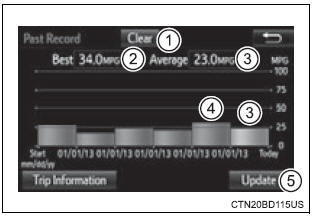
The average fuel consumption history is divided by color into past averages and the average fuel consumption since the last updated.
Use the displayed average fuel consumption as a reference.
This image is an example only.
Updating the past record dataUpdate the average fuel consumption by selecting "update" to measure the current fuel consumption again.
Resetting the dataThe fuel consumption data can be deleted by selecting "clear".
Cruising rangeDisplays the estimated maximum distance that can be driven with the quantity of fuel remaining.
This distance is computed based on your average fuel consumption.
As a result, the actual distance that can be driven may differ from that displayed.