Instrument cluster
Trip information
In this manual: Instrument cluster
7steps
~42min
2/5difficulty
Done 0 of 7
- Audio system with “apps” button
- Press the “apps” button.
- Touch “eco” on the “apps” screen.
If the “past record” screen is displayed, select “trip information”.

- Audio system with “car” button
Press the “car” button.
If the “past record” screen is displayed, select “trip information”.

- Resetting the consumption data
- Fuel consumption in the past 15 minutes
- Average vehicle speed since the engine was started.
- Elapsed time since the engine was started.
- Cruising range
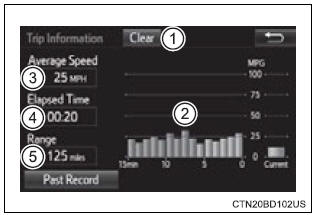
Vehicles without a smart key system: average fuel consumption for the past 15 minutes is divided by color into past averages and averages attained since the engine switch was last turned to the “on” position. Use the displayed average fuel consumption as a reference.
Vehicles with a smart key system: average fuel consumption for the past 15 minutes is divided by color into past averages and averages attained since the engine switch was last turned to ignition on mode. Use the displayed average fuel consumption as a reference.
This image is an example only.
Was this page helpful?