Driving position memory system
Your preferred driving position (the position of the driver’s seat, steering wheel and outside rear view mirrors) can be entered into the computer’s memory and recalled with the touch of a button. It is also possible to set this function to activate automatically when the doors are unlocked.
Three different driving positions can be entered into memory.
- Entering a position to memory
Turn the “ENGINE START STOP” switch to IGNITION ON mode.
STEP 2Adjust the driver’s seat, steering wheel, and outside rear view mirrors to the desired positions.
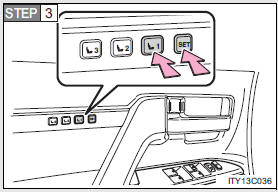
While pressing the “SET” button, or within 3 seconds after the “SET” button is pressed, press and hold button “1”, “2” or “3” until the signal beeps.
If the selected button has already been preset, the previously recorded position will be overwritten.
- Recalling the memorized position
Check that the shift lever is set in “P”.
STEP 1Turn the “ENGINE START STOP” switch to IGNITION ON mode.
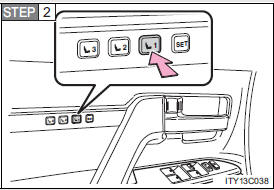
Press button “1”, “2” or “3” to recall the desired position.
Linking driving position memory with door unlock operationRecord your driving position to button “1”, “2” or “3” before performing the following:
- Using the wireless remote control
Turn the “ENGINE START STOP” switch to OFF after closing the driver’s door.
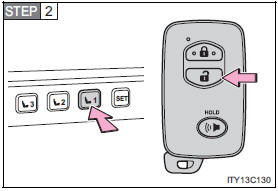
While pressing the desired button (“1”, “2” or “3”), press  on the wireless remote control until the signal beeps.
The driving position is recalled when the driver’s door is unlocked using the entry function or wireless remote control and the driver’s door is opened.
To prevent unintended triggering of the alarm, open and close a door once after a driving position has been recorded. (If a door is not opened within 60 seconds after is pressed, the doors will be locked again and the alarm will automatically be set.) In case that the alarm is triggered, immediately stop the alarm.
- Using the door lock switch
Carry only the key to which you want to link the driving position. If 2 or more keys are in the vehicle, the driving position cannot be linked properly.
STEP 1Turn the “ENGINE START STOP” switch to OFF after closing the driver’s door.
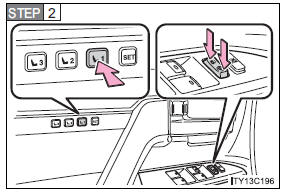
While pressing the desired button (“1”, “2”, or “3”), press the lock or unlock side on the door lock switch until the signal beeps.
The driving position is recalled when the driver’s door is unlocked using the entry function or wireless remote control and the driver’s door is opened.
- Canceling the linked door unlock operation
Turn the “ENGINE START STOP” switch to OFF after closing the driver’s door.
STEP 2Using the wireless remote control: While pressing “SET” button, press  button on the wireless remote control until the signal beeps.
Using the door lock switch: While pressing “SET” button, press the lock or unlock side on the door lock switch until the signal beeps.
- Retained accessory power
- Each memorized position (except for the steering wheel position) can be activated within 3 minutes after the driver’s door is opened, even if the “ENGINE START STOP” switch is turned off.
- Each memorized position (except for the steering wheel position) can be activated within 60 seconds after the driver’s door is closed, even if the “ENGINE START STOP” switch is turned off.
- To cancel seat position recall
Perform any one of the following operations.
- Press the “SET” button
- Press button “1”, “2” or “3”.
- Adjust the seat using the switches (only cancels seat position recall)
- Adjust the steering wheel using the tilt and telescopic steering control switch (only cancels steering wheel position recall)
- If the battery is disconnected
The memorized positions must be reset because the computer’s memory is erased when the battery is disconnected.
CAUTION- Seat adjustment caution
Take care during seat adjustment that the seat does not strike the rear passenger or squeeze your body against the steering wheel.
Test yourself
A quick Toyota Land Cruiser quiz: every answer comes with an explanation and a link to the manual page.