Using the steering switches
Some audio features can be controlled using the switches on the steering wheel.
Operation may differ depending on the type of audio system or navigation system. For details, refer to the manual provided with the audio system or navigation system.
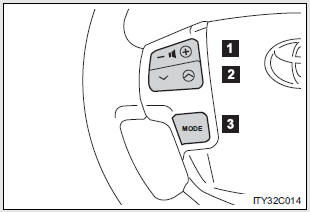
- Volume
- Radio mode:Selects a radio station
CD mode: Selects a track, file (MP3 and WMA) and disc
Bluetooth® audio mode: Selects a track and album
iPod mode: Selects a song
USB memory mode: Selects a file and folder
- Power on, select audio source
Press  when the audio system is turned off.
The audio system can be turned off by holding the switch down until you hear a beep.
Changing the audio sourcePress  when the audio system is turned on. The audio source changes as follows each time the button is pressed. If a mode cannot be used, it will be skipped.
Type A:
FM1 → FM2 → SAT1 → SAT2 → SAT3 → CD player → Bluetooth® audio → AUX → iPod or USB memory → AM
Type B:
FM1 → FM2 → CD player → Bluetooth® audio → AUX → iPod or USB memory → AM
Adjusting the volumePress “+” on  to increase the volume and “-” to decrease the volume.
Hold down the button to continue increasing or decreasing the volume.
Selecting a radio station STEP 1Press  to select the radio mode.
Press “∧” or “∨” on  to select a radio station.
To scan for receivable stations, press and hold the switch until you hear a beep.
Selecting a track/file or song STEP 1Press to select CD, Bluetooth® audio, iPod or USB memory mode.
Press “∧” or “∨” on  to select the desired track/file or song.
Press  to select Bluetooth® audio mode.
Press and hold “∧” or “∨” on  until you hear a beep.
Press  to select USB memory mode.
Press and hold “∧” or “∨” on  until you hear a beep.
Press  to select the CD mode.
Press and hold “∧” or “∨” on  until you hear a beep.
- Canceling automatic selection of a radio station
Press  again.
- To reduce the risk of an accident
Exercise care when operating the audio switches on the steering wheel.
Test yourself
A quick Toyota Land Cruiser quiz: every answer comes with an explanation and a link to the manual page.