Engine immobiliser
Data list / active test
In this manual: Engine immobiliser
8steps
~48min
2/5difficulty
Done 0 of 8
- Read data list
Using the intelligent tester's data list allows switch, sensor, actuator and other item values to be read without removing any parts. Reading the data list early in troubleshooting is one way to save time.
- Connect the intelligent tester (with can vim) to the dlc3.
- Turn the ignition switch on and turn the tester on.
- Select the following menu items: diagnosis / obd/mobd / immobiliser / data list.
- Check the results by referring to the table below.

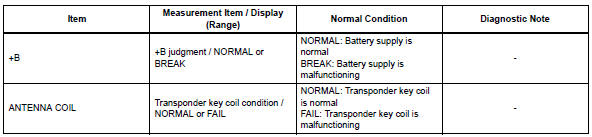
- Perform active test
performing the intelligent tester's active test allows relay, vsv, actuator and other items to be operated without removing any parts. performing the active test early in troubleshooting is one way to save time.
the data list can be displayed during the active test.
- Connect the intelligent tester (with can vim) to the dlc3.
- Turn the ignition switch on and turn the tester on.
- Select the following menu items: diagnosis / obd/mobd / immobiliser / active test.
- Perform the active test by referring to the table below.

Test yourself
A quick Toyota RAV4 quiz: every answer comes with an explanation and a link to the manual page.
Was this page helpful?