Fuel consumption information
The fuel consumption information can be displayed on the Multimedia Display.
Display procedure
Press  on the main menu,
then press "Trip information" on the sub menu.
For detail regarding the Multimedia Display, refer to "MULTIMEDIA OWNER'S MANUAL".
■ Current fuel consumption screen
If a screen other than current fuel consumption screen is displayed, press "Current".
Use the displayed average fuel consumption as a reference.
Some screens may vary depending on the type of multi-media display.
The image is an example only, and may vary slightly from actual conditions.
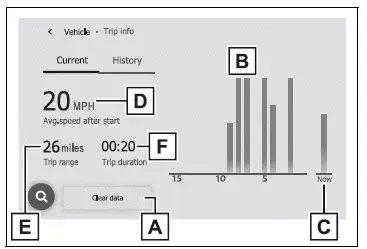
- Resetting the consumption data
- Fuel consumption in the past 15 minutes
- Current fuel consumption
- Average vehicle speed since the engine was started.
- Trip range
- Elapsed time since the engine was started.
■ History screen
If a screen other than history screen is displayed, press "History".
Use the displayed average fuel consumption as a reference.
Some screens may vary depending on the type of multi-media display.
The image is an example only, and may vary slightly from actual conditions.
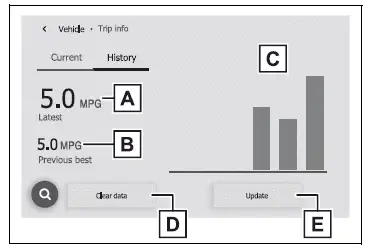
- Latest fuel consumption
- Best recorded fuel consumption
- Previous fuel consumption record
- Resetting the history data
- Updating the latest fuel consumption data
■Updating the history data
Update the latest fuel consumption by pressing "Update" to measure the current fuel consumption again.
■Resetting the data
The fuel consumption data can be deleted by pressing "Clear data".
■Trip range
Displays the estimated maximum distance that can be driven with the quantity of fuel remaining.
This distance is computed based on your average fuel consumption. As a result, the actual distance that can be driven may differ from that displayed.
Test yourself
A quick Toyota RAV4 quiz: every answer comes with an explanation and a link to the manual page.