Multi-information display
The multi-information display presents the driver with a variety of driving- related data including the current outside air temperature. 
Outside temperature display
Indicates the outside temperature.
The temperature range that can be displayed is from -40„af (-40„ac) to 122„af (50„ac).
Engine coolant temperature gaugeDisplays the engine coolant temperature.
Shift position and shift rangeDisplays the selected shift position or selected shift range
Trip informationDisplays odometer, trip meter, driving range, fuel consumption and other cruising related information.
Trip information Switching the displayItems displayed can be switched by pressing the “disp” button. 
Odometer
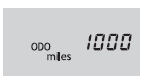 Displays the total distance the
vehicle has been driven.
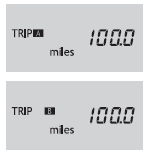 Displays the distance the vehicle
has been driven since the meter was last reset. Trip meters “a” and “b” can be used to record and display different distances independently.
Pressing and holding the “disp” button will reset the trip meter that is currently displayed.
Current fuel consumption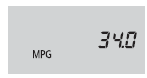 Displays the current rate of fuel
consumption.
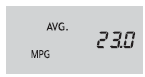 Displays the average fuel
consumption since the function was reset.
- The function can be reset by pressing the “disp” button for longer than 1 second when the average fuel consumption is displayed.
- Use the displayed average fuel consumption as a reference.
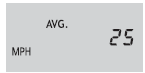 Displays the average vehicle speed
since the engine was last started.
 Displays the estimated approximate
distance that can be driven with the quantity of fuel remaining.
- This distance is computed based on your average fuel consumption. As a result, the actual distance that can be driven may differ from that displayed.
- When only a small amount of fuel is added to the tank, the display may not be updated.
Eco driving indicator light can be activated or deactivated.
- While the odometer is being displayed, press and hold the “disp” button to display the eco driving indicator light customization screen.
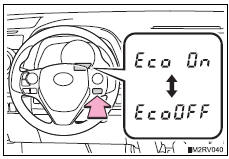
- Press the “disp” button to set eco driving indicator light to on or off.
- Press and hold the “disp” button to complete the setting.
The following information data will be reset:
- Trip meters “a” and “b”
- Average fuel consumption
- Average vehicle speed
- Driving range
In the following situations, the correct outside temperature may not be displayed, or the display may take longer than normal to change.
- When stopped, or driving at low speeds (approximately 12 mph [20 km/h] or less)
- When the outside temperature has changed suddenly (at the entrance/exit of a garage, tunnel, etc.)
 is displayed
The system may be malfunctioning. Take your vehicle to your toyota dealer.
CustomizationSettings can be changed. (Customizable features: „_p. 687)
Notice The multi-information display at low temperaturesAllow the interior of the vehicle to warm up before using the liquid crystal information display. At extremely low temperatures, the information display monitor may respond slowly, and display changes may be delayed.
Test yourself
A quick Toyota RAV4 quiz: every answer comes with an explanation and a link to the manual page.