Audio system
Operating the audio system
In this manual: Audio system
7steps
~42min
2/5difficulty
Done 0 of 7
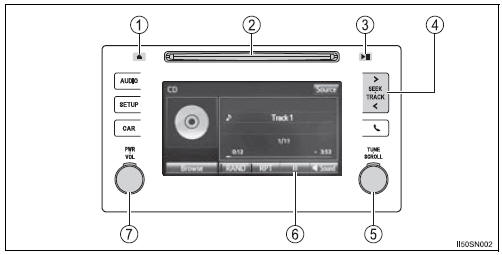
- Press this button to eject a disc
- Insert a disc into the disc slot
- Press to pause or resume playing music.
- Press the “<” or “>” button to seek up or down for a radio station, or to access a desired track or file.
- Turn this knob to select radio station bands, tracks and files. Also the knob can be used to select items in the list display.
 : Select to pause music.
 : Select to resume playing
music.- Press this knob to turn the audio system on and off, and turn it to adjust the volume.
Random playback
Select  to change on/off
Test yourself
A quick Toyota Sienna quiz: every answer comes with an explanation and a link to the manual page.
Was this page helpful?