Audio system
Steering wheel audio switches
In this manual: Audio system
~1min read
Some audio features can be controlled using the switches on the steering wheel.
Operation may differ depending on the type of audio system or navigation system. For details, refer to the manual provided with the audio system or navigation system.
Operating the audio system using the steering wheel switches
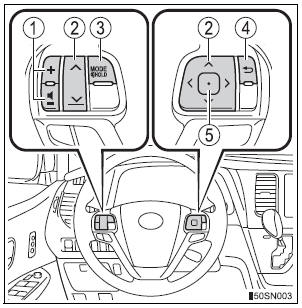
- Volume switch
- Increases/decreases volume
- Press and hold: Continuously increases/decreases volume
- Cursor switch (“” and “”)
- Selects (radio stations/radio presets/tracks/files/songs)
- Press and hold: Fast up/ down (radio stations)
- Fast up/down (tracks/files)
Cursor switch (“” and “”)
- Seek up/down (radio station)
- Press and hold: Continuously seek up/down (radio station)
- Press and hold: Fast forward/rewind (tracks/files/songs)
- “MODE/HOLD” switch
- Changes audio source
- Press and hold this switch to mute or pause the current operation To cancel the mute or pause, press and hold.
- Back switch
- Returns to the previous screen (Only when the back button is displayed)
- Enter switch
- Displays the preset/list screen
- Selects items
To reduce the risk of an accident
Exercise care when operating the audio switches on the steering wheel.
Test yourself
A quick Toyota Sienna quiz: every answer comes with an explanation and a link to the manual page.
Was this page helpful?