Cruise control
Operation check
In this manual: Cruise control
8steps
~48min
2/5difficulty
Done 0 of 8
1. INPUT SIGNAL CHECK

- Connect the intelligent tester to the DLC3.
- Check the cruise control main switch using the DATA LIST function in the intelligent tester (ONOFF, CANCEL, - (COAST)/SET, + (ACCEL)/RES (RESUME), and MODE).
2. INSPECT MODE SWITCH
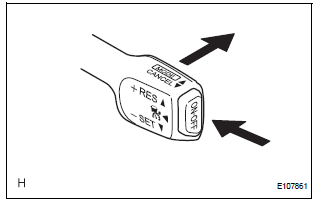
- Turn the ignition switch to the ON position.
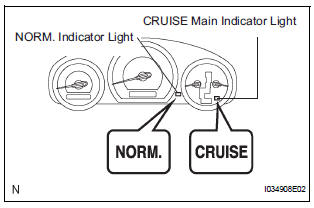
- Turn the cruise control main switch on. Then push the main switch to MODE for 1 second or more to change to the constant speed control mode. Check that "NORM." is indicated on the display.
NOTICE: Do not push any other switches before pushing the main switch to MODE. If another switch is pushed, turn the main switch off and repeat the procedure above. HINT: If a malfunction is detected, turn the ignition switch off and repeat the procedure above.
3. INSPECT STEERING PAD SWITCH ASSEMBLY
- Turn the ignition switch to the ON position.
- Turn the cruise control main switch on.
- Turn on the distance control switch of the steering pad switch.
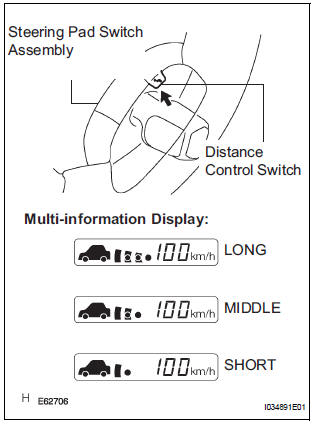
- Check that the indication of the vehicle-to-vehicle distance, which is shown on the multi-information display on the combination meter, changes from long to middle to short in that order.
HINT: The indication is automatically set to long each time the engine is started.
Test yourself
A quick Toyota Sienna quiz: every answer comes with an explanation and a link to the manual page.
Was this page helpful?