Audio system
Optimal use of the audio system
In this manual: Audio system
~1min read
On the “Sound Settings” screen, sound quality (Treble/Mid/ Bass), volume balance can be adjusted.
How to adjust the sound settings and sound quality
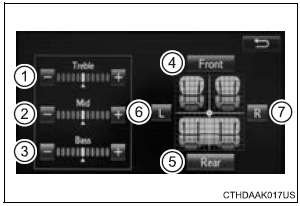
1, 2, 3 Select “-” or “+” to adjust the treble, mid or bass to a level between -5 and 5.
4, 5 Select “Front” or “Rear” to adjust the front/rear audio balance.
6, 7 Select “L” or “R” to adjust the left/right audio balance
The sound quality level is adjusted individually
The treble, mid and bass levels can be adjusted for each audio mode separately.
Test yourself
A quick Toyota Sienna quiz: every answer comes with an explanation and a link to the manual page.
Was this page helpful?