Audio system
Phone screen
In this manual: Audio system
2steps
~12min
1/5difficulty
Done 0 of 2
To display the screen shown below, press the  switch on the steering
wheel or the  button.
Several functions are available to operate on each screen that is displayed by selecting the 4 tabs.
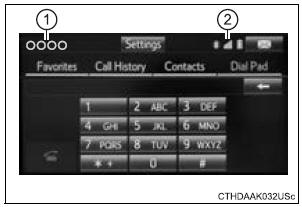
- Device name
- Bluetooth® connection status
Telephone switch
Microphone
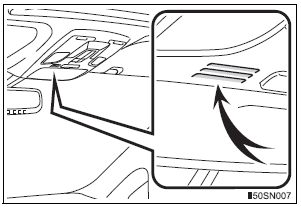
The vehicle’s built in microphone is used when talking on the phone.
The person you are speaking to can be heard from the front speakers.
To use the hands-free system, you must register your Bluetooth® phone in the system.
Test yourself
A quick Toyota Sienna quiz: every answer comes with an explanation and a link to the manual page.
Was this page helpful?