Audio system
Setup menu
In this manual: Audio system
2steps
~12min
1/5difficulty
Done 0 of 2
You can adjust the audio system to your desired settings.
Display “Setup” screen
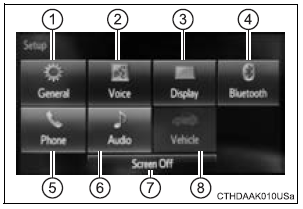
Press the “SETUP” button to display the “Setup” screen.
- Select to adjust the settings for operation sounds, screen animation, etc.
- Select to set the voice settings.
Test yourself
A quick Toyota Sienna quiz: every answer comes with an explanation and a link to the manual page.
Was this page helpful?