Audio system
Voice settings
In this manual: Audio system
5steps
~30min
2/5difficulty
Done 0 of 5
This screen is used for guidance for voice command systems setting.
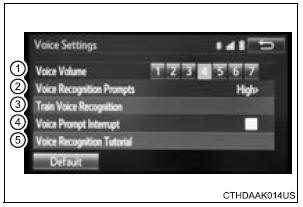
- Adjust the voice guidance volume setting.
- Set the voice recognition prompts “High”, “Low” or “Off”.
- Set the train voice recognition.
- Set the voice prompt interrupt on/off.
- Set the voice recognition tutorial.
To return to the default settings
Select “Default”, and then “Yes”.
Test yourself
A quick Toyota Sienna quiz: every answer comes with an explanation and a link to the manual page.
Was this page helpful?