Starting the engine
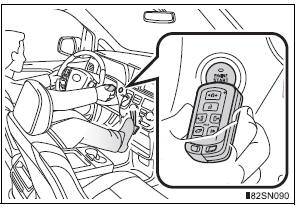
- Shift the shift lever to P and apply the brakes.
- Touch the Toyota emblem side of the electronic key to the engine switch.
An alarm will sound to indicate that the start function cannot detect the electronic key that is touched to the engine switch if any of the doors is opened and closed while the key is touched to the switch.
- Press the engine switch within 10 seconds after the buzzer sounds, keeping the brake pedal depressed.
In the event that the engine switch cannot be operated, contact your Toyota dealer.
Stopping the engine
Shift the shift lever to P and press the engine switch as you normally do when stopping the engine.
Replacing the key battery
As this above procedure is a temporary measure, it is recommended that the electronic key battery be replaced immediately when the battery depletes.
Alarm (if equipped)
Using the mechanical key to lock the doors will not set the alarm system.
If a door is unlocked using the mechanical key when the alarm system is set, the alarm may be triggered.
Changing engine switch modes
Within 10 seconds of the buzzer sounding, release the brake pedal and press the engine switch.
The engine does not start and modes will be changed each time the switch is pressed.
When the electronic key does not work properly
- Check if the battery-saving mode is set. If it is set, cancel the function.
Test yourself
A quick Toyota Sienna quiz: every answer comes with an explanation and a link to the manual page.