Transmitter ID not Registered
DTC C2171/71 Transmitter ID not Registered
DESCRIPTION
The IDs of each tire pressure warning valve and transmitters are registered to the tire pressure warning ECU.
When the IDs have never been registered, a DTC is output.

INSPECTION PROCEDURE
NOTICE:
- When replacing the tire pressure warning ECU, read the IDs stored in the ECU using the intelligent tester and note them down before removal.
- It is necessary to perform initialization (See page TW-23) after registration (See page TW-20) of the transmitter IDs into the tire pressure warning ECU after the ECU has been replaced.
1 CONFIRM REGISTRATION CONDITION (REGISTERED ID CODES)
(a) Make sure that the ignition switch is off.
(b) Connect the intelligent tester to the DLC3.
(c) Turn the ignition switch to the ON position.
(d) Select REGIT ID CODE by following the prompts displayed on the intelligent tester.
TIRE PRESSURE: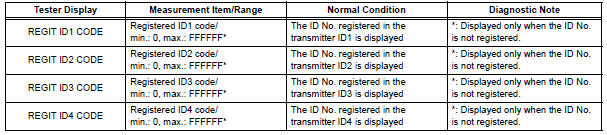
OK: The registered transmitter ID codes are displayed on the intelligent tester screen.


REPLACE TIRE PRESSURE WARNING ECU (See page TW-87)
2 PERFORM REGISTRATION (TRANSMITTER ID)
(a) Register the transmitter IDs for all the wheels (See page TW-20).

3 PERFORM INITIALIZATION
(a) Perform initialization (See page TW-23).

4 READ VALUE ON DATA LIST
(a) Make sure that the ignition switch is off.
(b) Connect the intelligent tester to the DLC3.
(c) Turn the ignition switch to the ON position.
(d) Select "TIREPRESS" by following the prompts displayed on the intelligent tester.
TIRE PRESSURE:

HINT: *: It may take about 5 to 6 minutes until the values are displayed. If the values are not displayed after a few minutes, perform troubleshooting according to the inspection procedure for DTCs C2121/21 to C2124/24 (See page TW-42).
Result 


END
Test yourself
A quick Toyota Sienna quiz: every answer comes with an explanation and a link to the manual page.