Brake system
Removing and installing mounting bracket, LHD vehicles
Remove dash panel end cover on driver side → General body repairs, interior; Rep. gr.70. - Remove footwell cover on driver side → General body repairs, interior; Rep. gr.68.
- Remove centre console cover on driver side → General body repairs, interior; Rep. gr.68.
- Remove storage compartment on driver side → General body repairs, interior; Rep. gr.68.
- Remove dash panel cover on driver side → General body repairs, interior; Rep. gr.68.
|
|
|
- Remove knee airbag -1- → General body repairs, interior; Rep. gr.69.
|
|
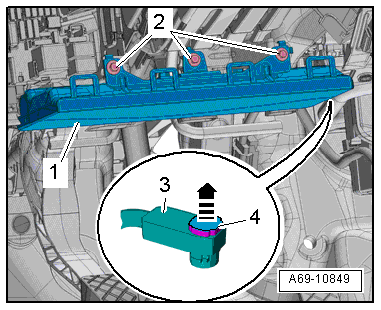 |
- Remove footwell vent on driver side → Heating, air conditioning system; Rep. gr.87.
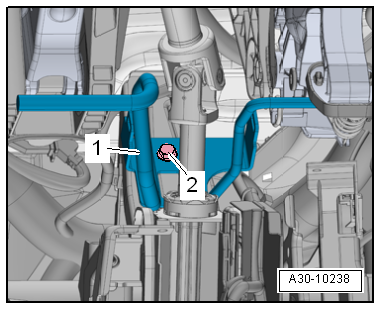
- Unbolt crash bar for brake pedal and lay it to one side → General body repairs, interior; Rep. gr.70.
|
|
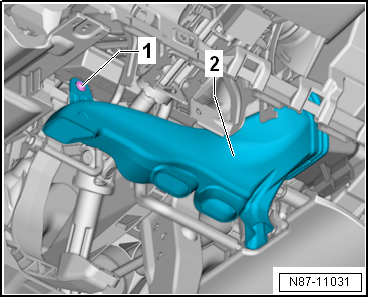 |
- Unscrew bolt -2-, detach crash bar -1- and push it to one side.
|
|
 |
- Remove control unit for data bus diagnostic interface -J533--3- and lay it to one side. → Electrical system; Rep. gr.97.
- Separate brake pedal from brake servo → Chapter.
- Pull connector off accelerator pedal position sender.
|
|
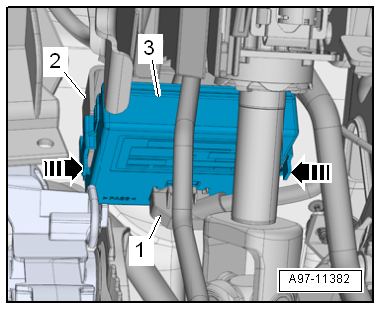 |
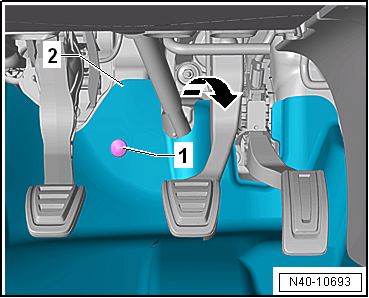
- Unscrew bolts -1- and fold footwell trim -2- in direction of arrow towards vehicle interior.
|
|
 |
- Unscrew nuts -1 to 4-.
- Carefully remove foot pedal cluster.
Installing
Install in reverse order of removal, observing the following:
- Connect brake pedal to brake servo → Chapter.
|
|
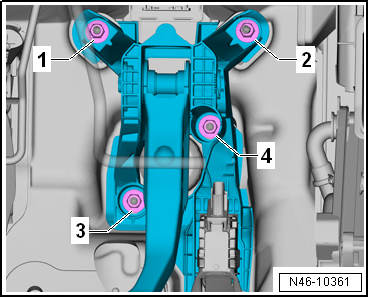 |
Tightening sequence for securing nuts:
Specified torques
→ Chapter „Assembly overview - brake pedal, LHD vehicles“
Crash bar → General body repairs, interior; Rep. gr.70.
Footwell vents → Heating, air conditioning system; Rep. gr.87.
Knee airbag → General body repairs, interior; Rep. gr.69.
Covers on driver side → General body repairs, interior; Rep. gr.68 |
|
|
?
Test yourself
A quick Volkswagen Golf quiz: every answer comes with an explanation and a link to the manual page.
Was this page helpful?