While driving
Using the cruise control system
In this manual: While driving
~3min read
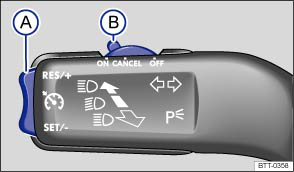
Fig. 153 On the left of the steering column: button and switch for the CCS (vehicles without Lane Assist)
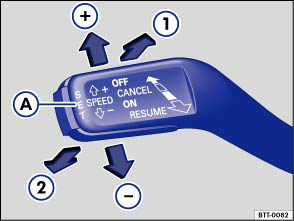
Fig. 154 On the left of the steering column: operating lever for the CCS (vehicles with Lane Assist)
 First read and observe the introductory information and safety warnings
Operating the cruise control system (vehicles without Lane Assist)
| Function | Switch position, switch control | Action |
|---|---|---|
| Switching on the CCS. | Move switch Ⓑ to position . | The system is switched on. After switch-on, no speed has been stored yet and the speed is not yet being controlled. |
| Activating CCS. | Press button Ⓐ in area . | The current speed is stored and controlled. |
| Switching off the CCS control temporarily. | Tap the switch Ⓑ to the position OR: depress the clutch or brake pedal. |
Control is switched off temporarily. The speed is stored in the memory. |
| Resuming CCS control. | Press button Ⓐ in area . | The stored speed is reactivated and controlled. |
| Increasing the set speed (during CCS control). | Press button Ⓐ in area briefly to increase the speed in small steps of 1 km/h and to save. | The vehicle accelerates actively until it reaches the new set speed. |
| Press and hold button Ⓐ in area to increase the speed continuously until the button is released and to save. | ||
| Decreasing the set speed (during CCS control). | Press button Ⓐ in area briefly to reduce the stored speed in small steps of 1 km/h and to save. | By easing off the accelerator and without actively braking, the system will decrease the speed until the new set speed is reached. |
| Press and hold button Ⓐ in area to increase the speed continuously. When the button is released, the speed reached will be saved. | ||
| Switch off CCS. | Switch Ⓑ in position . | The system is switched off. The stored speed will be deleted. |
Operating the cruise control system (vehicles with Lane Assist)
| Function | Switch position, switch control | Action |
|---|---|---|
| Switching on the CCS. | Position ① | The system is switched on. No control possible as no speed has been stored. |
| Activating CCS. | Button Ⓐ | The current speed is stored and controlled. |
| Switching off the CCS control temporarily. | Pressure point ② ODER: Depress brake or clutch pedal |
Control is switched off temporarily. The speed is stored in the memory. |
| Resuming CCS control. | Pressure point ① | The stored speed is reactivated and controlled. If no speed has been stored, then the current vehicle speed is stored and controlled. |
| Increasing the set speed (during CCS control). | Pressure point ⊕ | Press briefly: increase speed in increments of 10 km/h and store. Press longer: the vehicle will accelerate for as long as you press. The current speed will be stored as soon as you release. |
| Decreasing the set speed (during CCS control). | Pressure point ㊀ | Press briefly: reduce speed in increments of 10 km/h and store. Press longer: the vehicle speed will be reduced without braking intervention by easing off the accelerator for as long as you press. The current speed will be stored as soon as you release. |
| Switch off CCS. | Position ② | The system is switched off. The stored speed will be deleted. |
Driving downhill with CCS
If the CCS cannot maintain the vehicle speed when driving downhill, brake the vehicle with the foot brake and shift down gear if necessary.
Automatic switch-off
CCS control will be switched off automatically or interrupted temporarily:
- If the system detects a fault that could impair the function of the CCS
- If the vehicle speed is higher than the stored speed for an extended period with the accelerator pedal depressed
- If the brake pedal or clutch pedal is depressed
- If you change gear.
- If the airbag is triggered.
Test yourself
A quick Volkswagen Touran quiz: every answer comes with an explanation and a link to the manual page.
Was this page helpful?