Audible and visual signals of the Park Pilot at the rear
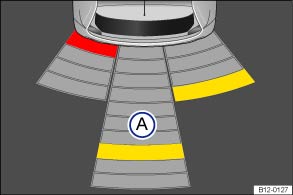 Fig. 104
Park Pilot screen display
in the portable infotainment system (supplied by Volkswagen).
 Read and observe the introductory information
and safety warnings first⇒
 Introduction
to the topic
| Key to the schematic diagram: | |
|---|---|
| ⇒ Fig. 104 | Meaning |
| Ⓐ | Scanned area behind the vehicle. |
 | Yellow segment for an obstacle. |
 | Red segment for a close obstacle. |
Depending on equipment, the area scanned by the ultrasonic sensors behind the vehicle is shown on the screen of the portable infotainment system (supplied by Volkswagen). Possible obstacles are displayed relative to the vehicle ⇒ .
Audible signals and screen display
If the vehicle approaches an obstacle at the rear, audible signals sound. If there is sufficient distance to an obstacle, an interval tone sounds. The shorter the distance becomes, the shorter the intervals become. If the obstacle is very close, a continuous tone sounds.
If a collision at the rear of the vehicle is imminent, the signal tones are output at the rear.
If you continue to drive closer to the obstacle while the continuous tone is sounding, the system is no longer able to measure the distance.
Depending on equipment, the scanned areas are shown in several segments in a graphic ⇒ Fig. 104. The closer the vehicle gets to an obstacle, the closer the segment moves to the displayed vehicle. At the latest, when the second-to-last segment is displayed, the collision zone has been reached. Do not continue driving!
| Area on the vehicle | Distance of the vehicle from the obstacle | Audible signal | Segment color when an obstacle is detected | |
|---|---|---|---|---|
| Ⓐ | rear center | approx. 31 – 150 cm | Interval tone | yellow |
| rear outer | approx. 31 – 60 cm | |||
| close obstacle | approx. 0 – 30 cm | Continuous tone | red | |

 Warning
Do not be distracted by the images of traffic shown on the screen.

It may take a few seconds before the audible and, if applicable, visual signals are output.
For more information on the portable infotainment system (supplied by Volkswagen), refer to the operating instructions inside the device ⇒ Accessories, parts replacement, repairs and modifications.