Vehicle key
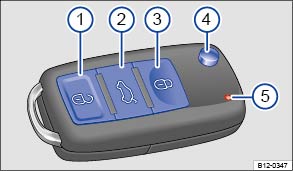 Fig. 13
Vehicle key.
 Read and observe the introductory information
and safety warnings first⇒
 Introduction
to the topic
Buttons in the vehicle key ⇒ Fig. 13 :
 Central locking button: unlock the vehicle.
 Open the tailgate.
 Central locking button: lock the vehicle.
 Key blade push button.
 Indicator light.
The indicator light flashes when a button is pressed. If it does not light up, the coin cell (commonly called the battery) in the vehicle key must be replaced ⇒ Replacing the coin cell.
Extending and folding the key bladePress button ⇒ Fig. 13④ to unlock the key blade, which then folds out.
To fold in the key blade, press button ④ and at the same time push the key blade back until it clicks into place.
Buttons in the vehicle keyThe vehicle can be locked and unlocked remotely with the vehicle key ⇒ Central locking and locking system.
If the vehicle cannot be locked or unlocked with the vehicle key, the vehicle key must be synchronized again or the coin cell in the vehicle key must be replaced ⇒ Replacing the coin cell.
Several vehicle keys can be authorized for one vehicle.
Synchronizing the vehicle keyWhen the button If the button is often pressed outside the operating range
, the vehicle may no longer be locked or unlocked with the vehicle key. In this case, the vehicle key must be resynchronized as follows:
- Fold out the key blade.
- ButtonPress the button on the vehicle key. Stand
directly next to the vehicle.
- Unlock the vehicle with the key blade within one minute. The synchronization is complete.
The vehicle identification number (VIN) is required to obtain a replacement key or additional vehicle keys.
New vehicle keys are available from a Volkswagen Partner or a qualified workshop. They must be adapted to the vehicle before use.
In addition to the electronic vehicle key, the key set may include a mechanical vehicle key. This is either separate or located inside the electronic vehicle key.

 Note
Every vehicle key contains electronic components. Protect the vehicle key from damage, moisture and strong shocks.

Only press the buttons in the vehicle key when the corresponding function is actually needed. Pressing a button unnecessarily can cause the vehicle to unlock unintentionally or the alarm to trigger. This also applies if you think you are outside the operating range.
The function of the vehicle key can be temporarily impaired by interference from transmitters near the vehicle that operate in the same frequency range, for example a two-way radio or cell phone.
Obstacles between the vehicle key and the vehicle, poor weather conditions and a weakening coin cell reduce the radio range.
If the buttons in the vehicle key ⇒ Fig. 13 or one of the central locking buttons ⇒ Central locking and locking system are pressed several times in quick succession, the central locking switches off briefly to protect it from overload. The vehicle is then unlocked. If necessary, lock the vehicle.