Before driving
Replacing the button cell battery
In this manual: Before driving
2steps
~12min
1/5difficulty
Done 0 of 2
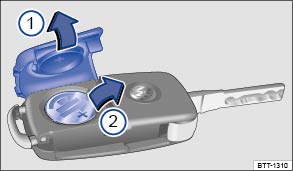 Fig. 14
Vehicle key: Replace the button cell battery.
 Read and observe the introductory information
and safety warnings first⇒
 Introduction
to the topic
The button cell is located on the back of the vehicle key under a cover ⇒ Fig. 14 .
 Remove the cover.
 Remove the button cell.
Volkswagen recommends having the button cell replaced by a Volkswagen Partner or a qualified workshop.
Replacing the button cell battery- Fold out the key blade.
- Remove the cover on the back of the vehicle key ⇒ Fig. 14① in the direction of the arrow ⇒
 .
- Pry the button cell out of the battery compartment with a suitable thin object ⇒ Fig. 14② .
- Press the new button cell into the battery compartment against the direction of the arrow ⇒ Fig. 14② ⇒ .
- Press the cover onto the vehicle key housing against the direction of the arrow until it clicks into place ⇒ Fig. 14① .

 Note
- Improper battery replacement can damage the vehicle key.
- Unsuitable batteries can damage the vehicle key. Only replace a discharged battery with a new battery of the same voltage, same size and specification.
- When installing the battery, make sure the polarity is correct.

Dispose of discharged batteries in an environmentally responsible way.
Was this page helpful?