Portable infotainment system
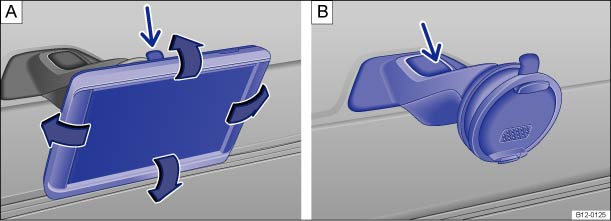 Fig. 134
On the center console: remove the infotainment system
and holder.
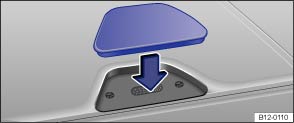 Fig. 135
On the center console: close the opening
of the infotainment system holder.
 Read and observe the introductory information
and safety warnings first⇒
 Introduction
to the topic
Depending on the vehicle, additional vehicle functions and applications can be used via the portable infotainment system (supplied by Volkswagen) ⇒ .
Tilt and viewing angle can be adjusted by moving the infotainment system into the desired position ⇒ Fig. 134 ,
⇒ .
An electronic owner's manual for the portable infotainment system (supplied by Volkswagen) can be displayed directly on the device.
Possible functionsDepending on the vehicle, the following functions are available in the portable infotainment system (supplied by Volkswagen):
- Extended multifunction display (MFA) with additional instruments ⇒ Instruments.
- Operation of a factory-installed radio and a connected media player ⇒ Radio booklet.
- Picture viewer.
- Navigation.1)
- Hands-free system for mobile phones via Bluetooth.
- Display for open doors and tailgate.
- ParkPilot.
- Shift recommendation and driving tips.
- Think Blue. Trainer.
- Fuel level warning.
- Switch on the portable infotainment system (supplied by Volkswagen).
- Press the more button on the screen.
- Press the Manual button.
- Select the desired chapter and press the corresponding button.
- Hold the portable infotainment system securely at the top and bottom with one hand.
- Release button ⇒ Fig. 134Press (arrow)
until the device can be removed from the holder.
- Remove the portable infotainment system and stow it securely.
- If necessary, remove the holder for the portable infotainment system.
- If necessary, install the holder for the portable infotainment system ⇒ .
- Hold the portable infotainment system securely at the top and bottom with one hand.
- Insert the portable infotainment system into the upper bracket and press it into the holder at the bottom until it clicks into place audibly ⇒ .
- If necessary, remove the portable infotainment system.
- Hold the support arm of the holder securely with one hand while pressing the release button ⇒ Fig. 134
 (arrow).
- Remove the holder upward from the instrument panel.
- If necessary, close the opening by fitting the corresponding cover cap in the direction of the arrow ⇒ Fig. 135.
- If necessary, remove the corresponding cover cap from the opening of the holder, opposite to the direction of the arrow ⇒ Fig. 135.
- Insert the holder into the opening from above and press down until it audibly clicks into place ⇒ .

 Warning
Driver distraction can cause accidents and injuries. Operating the portable infotainment system can distract you from traffic conditions.
- Always drive attentively and responsibly.
- Set the volume so that acoustic signals from outside can always be clearly heard (e.g. the horn of emergency services).
- A volume set too high can damage hearing. This also applies if hearing is exposed to high volume levels for only a short time.
Warning Route guidance recommendations and displayed traffic signs from the navigation system may differ from the current traffic situation.
- Traffic signs and traffic regulations take precedence over driving recommendations and navigation displays.
- Adapt speed and driving style to visibility, weather, road and traffic conditions.
Warning A portable infotainment system that is not secured or not properly secured can be thrown around the vehicle interior during sudden driving or braking maneuvers, or in an accident, and cause injuries.
- Securely install the holder for the portable infotainment system in the corresponding opening in the instrument panel.
- Always insert the portable infotainment system securely into the holder or stow it securely in the vehicle.

 Note
Incorrect tilt and viewing angle settings can damage the portable infotainment system.
- When adjusting the portable infotainment system, move it carefully and not beyond the end stops.
Note Very high or very low ambient temperatures can impair the function of the portable infotainment system or damage the device.
- Always take the portable infotainment system with you when leaving the vehicle to protect it from very high or very low temperatures or strong sunlight.
Note Moisture can damage the electrical contacts in the instrument panel for the portable infotainment system.
- Do not clean the holder for the portable infotainment system with a damp cloth. Use a dry cloth instead.

Volkswagen recommends always taking the portable infotainment system
with you when leaving the vehicle to prevent theft.
1) depending on country