Infotainment
Operating the system
In this manual: Infotainment
~1min read

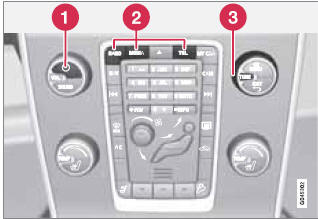
Operating the system
1 Short press: switch the system ON. Press and hold: switch the system OFF.
2 Infotainment system mode buttons (RADIO, MEDIA, or TEL). Press a button to access the desired mode and press the same button again to access the mode's menus. Release the button and wait several seconds to automatically accept your selection. You can also navigate in the menus by turning TUNE to make a selection and pressing OK/MENU to confirm your selection.
3 Turn TUNE to navigate among the menu alternatives in the display (FM1, DISC, etc.), or to quickly scroll among tracks, folders or radio stations.
Test yourself
A quick Volvo XC60 quiz: every answer comes with an explanation and a link to the manual page.
Was this page helpful?