Sub-channels

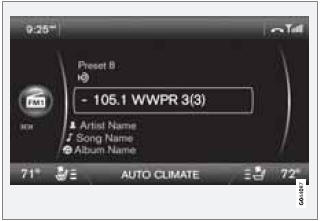
Example of an HD Radio station with sub-channels
In many cases, a main HD Radio station (FM wavebands only) will also have sub-channels offering additional types of programming or music.
In such cases, the “-” symbol will be displayed to the left of the frequency number and a number will be displayed to the right of the frequency number indicating that the currently tuned frequency has at least one sub-channel.
The "2" in the illustration indicates that you are currently listening to the first sub-channel on frequency 93.9.
Selecting sub-channels
To listen to a station's sub-channel(s), press and hold the right arrow key on the center console or on the steering wheel keypad for approximately 1 second. To go back to the main channel, press and hold the left arrow key on the center console or on the steering wheel keypad for approximately 1 second. To go to subchannel 2 (if available), press and hold the right arrow key on the center console or on the steering wheel keypad for approximately 1 second.
If you are currently tuned to a frequency's main channel, pressing and holding the left arrow key for approximately 1 second will tune to the next lower radio frequency.
Sub-channels can also be stored as presets, see page 215 for information on storing stations.
If you press a sub-channel's preset button, it may take up to 6 seconds before the channel becomes audible. If you press this button while you are out of digital range of the transmitter, No HD reception will be displayed.
Test yourself
A quick Volvo XC60 quiz: every answer comes with an explanation and a link to the manual page.