Information display

Message in the text windows
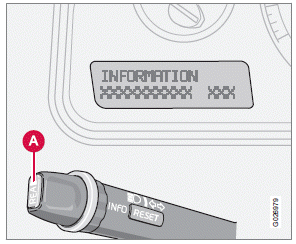
When a warning light in the instrument panel comes on, a message is also displayed in the text window. After you have read the message, you can erase it by pressing button A (see illustration).
If a warning message is displayed when e.g.
you are using the trip computer, this message must be erased before you can access the function of your choice. Press button A to erase the warning message.
You can scroll through the stored messages by pressing button A (see illustration). The text window can be cleared (the message will be returned to memory) by pressing button A again.

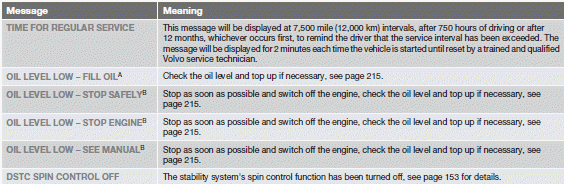
A The yellow warning symbol also lights up.
B The red warning symbol also lights up.
Test yourself
A quick Volvo XC60 quiz: every answer comes with an explanation and a link to the manual page.