Trip computer

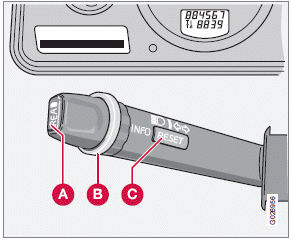
A READ (press to acknowledge/confirm/erase a message)
B Thumb wheel (used to scroll among the trip computer menus)
C RESET
The trip computer stores information gathered from several systems in your vehicle and has four menus that can be displayed in the text window.
• Driving distance on current fuel reserve
• Average fuel consumption
• Current fuel consumption
• Average speed
• Current speed in mph (Canadian models only)
• DSTC (see page 153 for detailed information)
Press button A again to return to the trip computer function.
1. Trip computer controls and functions The trip computer functions can be accessed by twisting INFO (B) one step at a time in either direction. Twisting a final time returns you to the original function.
The trip computer can be reset (current data will be erased from system memory) by pressing RESET (button C).
2. Driving distance on current fuel reserve This function shows the approximate distance that can be driven on the fuel remaining in the tank. The calculation is based on average fuel consumption during the last 20 miles (30 km) of driving and the amount of fuel remaining in the tank when the reading was taken.
When "----" is displayed in the text window, refuel as soon as possible.
3. Average fuel consumption This value indicates fuel consumption since the last time the trip computer was reset (by pressing RESET, button C). When the engine is switched off, information on fuel consumption is stored and remains in system memory until the RESET (button C) is pressed again.
4. Current fuel consumption This value indicates the current fuel consumption, based on readings taken once per second.
When the vehicle is not moving, "----" will be displayed.
5. Average speed This value indicates average speed since the last time the trip computer was reset (by pressing RESET, button C). When the engine is switched off, information on average speed is stored and remains in system memory until the RESET (button C) is pressed again.
6. Current speed in miles per hour (Canadian models only) This function provides the driver with an instantaneous conversion of the vehicle's current speed from km/h to mph.
Test yourself
A quick Volvo XC60 quiz: every answer comes with an explanation and a link to the manual page.