Audio
Storing stations
In this manual: Audio
~1min read

To store a selected station under one of the station setting buttons 0 – 9 (2):
1. Set the desired station.
2. Press the button under which the station is to be stored and keep it depressed. The sound will be interrupted for several seconds and STATION STORED is shown in the display. The station is now stored.
You can store up to 10 stations each for AM, FM1 and FM2, i.e. a total of 30 stations.
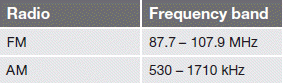
Frequency ranges
Test yourself
A quick Volvo XC60 quiz: every answer comes with an explanation and a link to the manual page.
Was this page helpful?