Audio
Overview of Bluetooth® controls
In this manual: Audio
~1min read

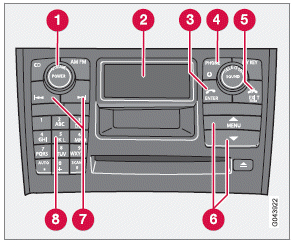
Center console control panel
1 VOLUME: the buttons on the steering wheel keypad can be also be used.
2 Display
3 ENTER: press to answer an incoming call, make menu selections or activate the phone from standby mode.
4 PHONE: press to turn standby on/off.
5 EXIT: press to end a call, reject an incoming call, go back in the menu system, cancel a selection or to erase numbers/letters that have been entered.
6 MENU: press to access the menu system.
Press the arrow keys to go up or down among menu alternatives.
7 Search: go forward or back when entering text/numbers.
8 Alphanumeric keys and menu shortcuts.
Test yourself
A quick Volvo XC60 quiz: every answer comes with an explanation and a link to the manual page.
Was this page helpful?