Audio
RSE-AUX connectors and 12-voltsocket
In this manual: Audio
~1min read

The three color-coded (yellow-white-red) RSEAUX connectors can be used to connect an auxiliary device to the RSE system. Always follow the connection instructions provided with the auxiliary device. Devices connected to RSE-AUX can use the RSE screens, cordless headphones, the headphone sockets or the vehicle’s audio system speakers.
Connecting a device to RSE-AUX
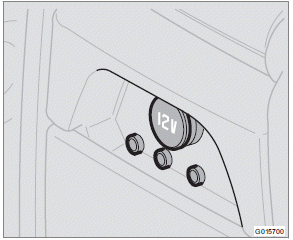
RSE-AUX connectors are located on the rear side of the tunnel console
1. Connect the video cable from the auxiliary device to the yellow connector.
2. Connect the left audio cable to the white connector and the right cable to the red connector.
3. Connect the power cable to the 12-volt socket (if the device is designed for 12-volt current).
For the location of the 12-volt sockets.
Test yourself
A quick Volvo XC60 quiz: every answer comes with an explanation and a link to the manual page.
Was this page helpful?