Loading, storage and passenger compartment
Installing and Removing the Cargo Cover
In this manual: Loading, storage and passenger compartment
2steps
~12min
1/5difficulty
Done 0 of 2
The cover can be extended to conceal objects in the cargo compartment.
Installing the Cargo Cover
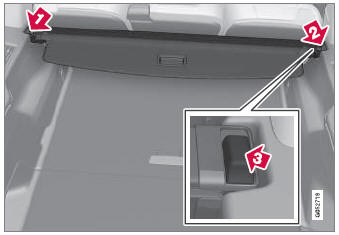
 Press the end piece on one side of the cover into the retaining bracket in the side panel of the cargo compartment.
 Then put the other end piece in the recess in the side panel on the opposite side.
 Push the end piece down on both sides, one at a time.
- When a click is heard and the red marks on each end piece are no longer visible, the cover is in place. Make sure that it is secure.
Removing the Cargo Cover
In the retracted position:
- Press the button on one of the cover's ends and lift out that end.
For 7-seat models - remove the third row seat belt latches from the hooks above the side panels.
- Carefully lift the cover up and out.
- The other end will release automatically and the cover can then be lifted out of the cargo compartment.
* Option/accessory.
Test yourself
A quick Volvo XC90 quiz: every answer comes with an explanation and a link to the manual page.
Was this page helpful?