Sistema de audio y vídeo
Multipantalla (pantalla CRT)
En este manual: Sistema de audio y vídeo
~1min de lectura
SUSTITUCIÓN
NOTA:
- COMPONENTES: Ver página 67-2
- La instalación se realiza en orden inverso al del desmontaje.
1. RETIRE EL CONJUNTO DEL PANEL DE ACABADO CENTRAL DEL INSTRUMENTO (VER PÁGINA 71-10)
2. QUITAR CONJUNTO DEL PANEL Y CONTROL INTEGRADO
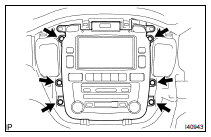
(a) Quite los 6 pernos.
(b) Desconecte los conectores y retire el conjunto del panel y control integrado.
3. QUITAR SOPORTE A DEL CONTROLADOR DE MULTIPANTALLA
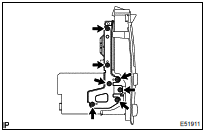
(a) Quite los 7 tornillos y el soporte A del controlador de multipantalla.
4. QUITAR SOPORTE B DEL CONTROLADOR DE MULTIPANTALLA
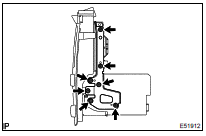
(a) Quite los 7 tornillos y el soporte B del controlador de multipantalla.
5. QUITAR PANTALLA DE LA MULTIPANTALLA (PANTALLA CRT)
6. INSTALAR PANTALLA DE LA MULTIPANTALLA (PANTALLA CRT)
NOTA: Realice el ajuste automático del ruido de pantalla cuando aparezca ruido en la misma (ver página 05-1803).
¿Le resultó útil esta página?