Réglage par groupe PTY (Program type) (réception FM uniquement)

Appuyez sur la touche « PTY/CAT » pour passer en mode de sélection PTY. Le groupe PTY que vous écoutez actuellement s'affiche alors pendant 10 secondes. En mode de sélection PTY, « PTY SEL » s'affiche à l'écran.
Sélection du groupe PTY (Program type)
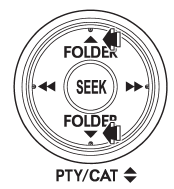
En mode de sélection PTY, appuyez sur la touche « PTY » «  ”
ou “ » pour changer de groupe PTY d'une
étape à la fois.
Appuyer sur « » fait passer le groupe PTY vers le haut d'une
étape. Appuyer sur «» fait passer le groupe PTY vers le bas d'une
étape. Cette opération modifie uniquement l'affichage. Elle ne change pas la station actuellement reçue.
Recherche dans un groupe PTY (Program type)
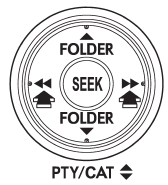
En mode de sélection PTY, lorsque le groupe PTY souhaité a été sélectionné, appuyez sur la touche « SEEK » «  ou «
 »
effectue une recherche dans ce groupe PTY. Dans ce cas, « PTY SEEK » s'affiche à l'écran. Appuyer sur « » : recherche vers le haut. Appuyer sur « »
effectue une recherche vers le bas.
La fonction de commande revient au mode normal après environ 10 secondes.
Testez-vous
Un quiz rapide sur Subaru Legacy : chaque réponse est expliquée, avec un lien vers la page du manuel.