Driver assistance
Perpendicular parking
In this manual: Driver assistance
~1min read
Applies to: vehicles with rearview camera
This view may be used when parking in a garage or in a parking space.
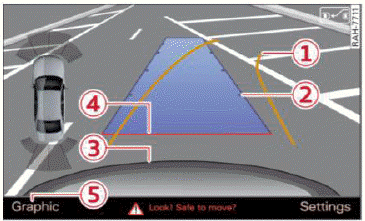
Fig. 122 Infotainment system: aiming at a parking space
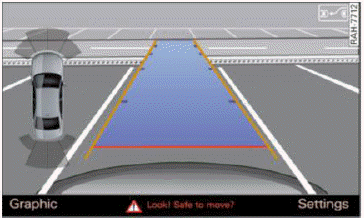
Fig. 123 Infotainment system: aligning the vehicle
- Turn the Infotainment system on and shift into reverse gear.
- The orange orientation lines 1 show the direction of travel of the vehicle. Turn the steering wheel until the orange orientation lines appear in the parking space
 fig. 122. Use the markings 2 to help you estimate the distance to an obstacle. Each marking represents approximately 3 ft (1 m). The blue area represents an extension of the vehicle's outline by approximately 16 ft (5 meters) to the rear.
- While driving in reverse gear, adjust the steering wheel angle to fit the parking space using the orange orientation lines for assistance. 3 represents the rear bumper. At the very latest, stop the vehicle when the red orientation line 4 borders an object.
Was this page helpful?