Driver assistance
Trailer mode
In this manual: Driver assistance
~1min read
Applies to: vehicles with peripheral cameras and trailer hitch
This view assists you in positioning the vehicle in front of a trailer.
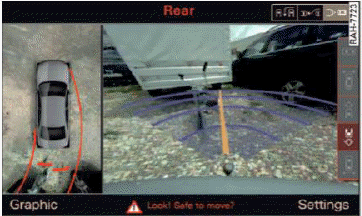
Fig. 138 Infotainment system: rear mode
Requirement: the trailer mode must be selected.
- Now you can position your vehicle in front of the trailer
 in General information. The orange orientation line indicates the expected path toward the trailer hitch. Use the blue lines to help you estimate the distance to the trailer hitch.
Setting the mode
Applies to: vehicles with peripheral cameras
- Select: [CAR] function button > (Car) Systems control button > Driver assistance > Parking aid > Front/rear camera switching > Auto or Manual.
Auto - This view behind the vehicle (Rear mode) is displayed automatically when you shift into reverse.
This view in front of the vehicle (Front mode) is displayed automatically when you shift into the forward gears.
Manual - When you switch the system on, the view behind the vehicle (Rear mode) is always displayed and it does not switch to the Front mode when a forward gear is selected.
Was this page helpful?