Turn signals / flashing light / high beam
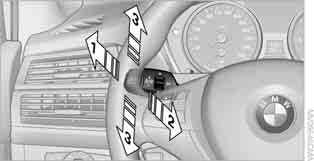
1 High beam
2 Headlight flasher
3 Turn signals
Activating the Turn Signals
Press the lever switch past the detent point.
To turn off the turn signals manually, press the switch up to the detent point.
 Rapid flashing of the indicator lamp indicates that one of the turn signal bulbs has failed (when driving with
Turn signal activation without latching
Press the lever switch up to the detent point. Hold it in this position until you decide to turn off the turn signals.
Turn signal flashing
Press the lever switch without going past the detent point – the turn signals will flash three times.
This function is programmable.
For principles of iDrive operation, refer to.
1. Press the button .
The main menu opens.
2. Press the controller to open the menu .
3. Select "Settings" and press the controller.
4. Select "Vehicle / Tyres" and press the controller.
5. Move to the upper field. Turn the controller to select "Light" and press the controller.

6. Select "Triple turn signal activation" and press the controller.
 The triple turn signal function is enabled.
This setting is stored in the memory for the key currently in use.
Test yourself
A quick BMW X3 quiz: every answer comes with an explanation and a link to the manual page.