Driver assistance functions
The functions described below make the rear view camera even more effective.
They are activated only when the tailgate is fully closed.
Track lines
Track lines are superimposed on the camera image and help to more accurately assess the maneuvering space when parking on a level road.
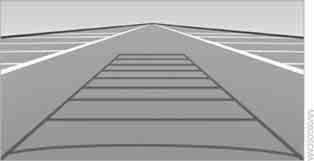
The track lines depend on the steering wheel angle and change constantly with it.
Turning radius lines
Static turning radius lines are superimposed on the camera image and show the vehicle's minimum turning radius on a level road.
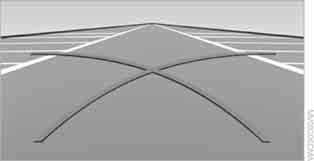
Parking using track lines and turning radius lines
1. Position the vehicle so that the turning radius lines are within the free space.
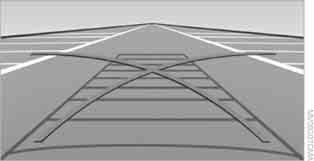
2. Turn the steering wheel so that the track lines overlap the corresponding turning radius lines.

With the steering wheel turned in this way, reversing takes place along the minimum turning radius.
Virtual camera tilt
The camera's field of view depends on the driving speed:
at low speed, the camera lens is directed toward the road surface, and at higher speed, toward the horizon.
This allows the image to be shown enlarged on the control display.
To activate virtual camera tilt, select "Camera picture on full screen", see Display.
Towing hitch approach
When it is necessary to hitch a trailer, this function enlarges the image of the towing hitch so that it is easier to monitor the approach to the trailer.
The distance between the trailer and the towing hitch can be conveniently estimated using the static guide lines. The marks on the lines indicate intervals of 20 cm or 10 cm.
The coupling line, which depends on the steering wheel angle, helps to accurately align the towing hitch with the trailer.
The approach function can be activated while the rear view camera is on. It switches off when the speed exceeds 7 km/h.
Distance markers for obstacles
Three-dimensional markers are superimposed on the rear view camera image, with a color gradation corresponding to the PDC markers. These markers help to estimate the distance to an object.
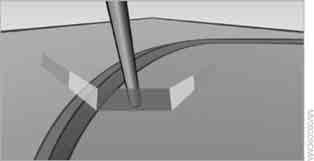
The marker display switches off when the reversing speed approaches 20 km/h.
Test yourself
A quick BMW X3 quiz: every answer comes with an explanation and a link to the manual page.