Physical limits of system operation
 The automatic system cannot judge the need to switch off the high beams better than the driver. Therefore, if you see such a need, switch off the high beams manually.◄
The following are examples of situations in which the system's capabilities are limited and driver intervention is required:
► Adverse weather conditions (fog, heavy precipitation)
► Poorly lit road users (pedestrians, cyclists, horse-drawn vehicles, etc.), a railway line or waterway next to the road, wild animals
► Sharp curves, steep ascents and descents, oncoming vehicles crossing at right angles or partially hidden
► Poorly lit built-up areas and strongly reflective signs
► Low speed
► The windshield area in front of the rear view mirror is dirty or obstructed (by a sticker, toll badge, etc.)
► The sensor is dirty. Clean the sensor (located on the inside rear view mirror, near the windshield) with a cloth moistened with glass cleaner
Switching off via iDrive
For principles of iDrive operation, refer to.
1. Press the button .
The main menu opens.
2. Press the controller to open the menu .
3. Select "Settings" and press the controller.
4. Select "Vehicle / Tyres" and press the controller.
5. Move to the upper field. Turn the controller to select "Light" and press the controller.
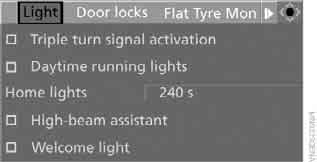
6. Select "High-beam assistant" and press the controller.
 The high beam assist system is switched off.
This setting is stored in the memory for the key currently in use.
Test yourself
A quick BMW X3 quiz: every answer comes with an explanation and a link to the manual page.