Manual adjustment of air distribution
Several programs are available for adjusting air distribution (separately for the driver's and front passenger's sides):
► to the upper body area
► to the upper body area and footwell
► to the footwell
► driver's side: to the windows and footwell
► individual program
Selecting programs
 Press the button as many times as necessary until the desired program appears on the control display.
Individual air distribution – individual program
This program stores your own settings.
For principles of iDrive operation, refer to.
1. Press the button .
The main menu opens.
2. To switch to the “Climate” menu, move the controller to the left.
3. Select "Air distribution" and press the controller.
Air flow is adjusted separately for the driver's and front passenger's sides in the left and right fields.
4. Select the driver's or front passenger side by sliding the controller to the right or left as many times as necessary.
5. Slide the controller to select the desired field.
6. Turn the controller to adjust the air distribution.
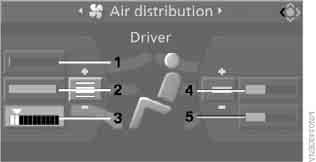
Driver side:
1 Air flow to the windshield and side windows
2 Air flow to the upper body area
3 Air flow to the footwell
Front passenger side:
4 Air supply to chest area
5 Air supply to footwell area
 Pressing the AUTO button activates the automatic air distribution program.◄
When air distribution is adjusted manually, the air volume is still controlled automatically.
Test yourself
A quick BMW X3 quiz: every answer comes with an explanation and a link to the manual page.