Entertainment
Buttons on the CD player
In this manual: Entertainment
~1min read
Equipped with one disc drive
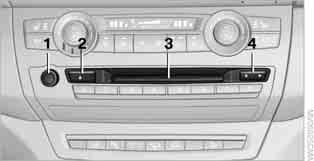
1 Switching audio equipment on/off, volume control
► Press: switch on and off.
After switching on, playback starts with the radio station or track that was played last.
► Turn: adjust the volume.
2  CD eject
3 Audio CD drive
4 Station/track search
► select another station
► select a track on the CD
Equipped with two disc drives
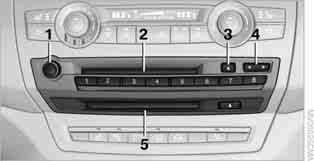
1 Switching audio equipment on/off, volume control
► Press: switch on and off.
After switching on, playback starts with the radio station or track that was played last.
► Turn: adjust the volume.
2 Audio CD drive
3 CD eject
4 Station/track search
► select another station
► select a track on the CD
► switch TV channels
5 Navigation DVD drive
Test yourself
A quick BMW X3 quiz: every answer comes with an explanation and a link to the manual page.
Was this page helpful?