Entertainment
RDS Radio Data System
In this manual: Entertainment
~1min read
RDS transmits additional information on the FM band. This allows the following:
► For radio stations broadcasting on several frequencies, the frequency with the best reception quality is selected automatically.
► With good reception, the station name is shown on the control display. With weak reception or interference, the station name only appears after a short time.
Switching RDS On and Off
1. Select "FM" and press the controller.
"Set" is highlighted.
2. Press the controller.
The following menu items appear on the screen.
3. Select "RDS" and press the controller.
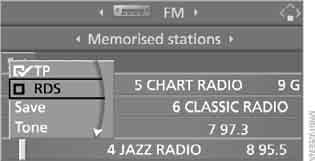
 RDS is switched on.
This setting is stored in the memory for the key currently in use.
Test yourself
A quick BMW X3 quiz: every answer comes with an explanation and a link to the manual page.
Was this page helpful?