Operation
Viewing Stored Messages
In this manual: Operation
~1min read
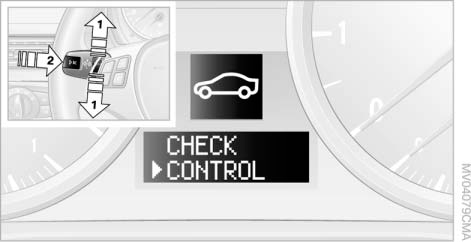
1. Press button 1 on the turn signal lever up or down until the corresponding symbol and the word "CHECK CONTROL" appear on the display.
2. Press button 2.
If there are no messages, "CHECK OK" is displayed.
If a message is present, the corresponding lamp illuminates.
3. To view the next messages, press button 1.
4. Press button 2.
The display will again show the outside temperature and the time.
Test yourself
A quick BMW X3 quiz: every answer comes with an explanation and a link to the manual page.
Was this page helpful?