Parking lights and low beams
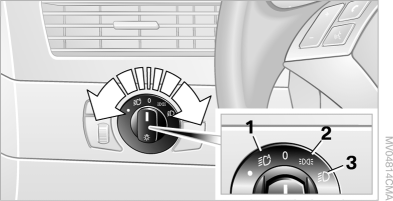
1 Automatic headlight control and Adaptive Headlights
2 Parking lights
3 Low beam and Daytime Running Lights
Parking lights
When the switch is in position 2, the vehicle is illuminated on all sides.
The parking lamps can be used for parking. Regarding additional one-sided parking lamps.
Low beam
When the switch is in position 3, the low beams illuminate only when the ignition is on. With the ignition off, the parking lights remain on.
"Follow me home"
If the flash-to-pass function is operated after the ignition and headlights have been switched off, the low beams will illuminate. The duration of the headlight activation can be set via the Control Display, or this function can be switched off entirely.
iDrive operating principles
1. Press the button .
The main menu opens.

2. Press the controller to open the menu .
3. Select "Vehicle settings" and press the controller.
4. Select "Light" and press the controller.
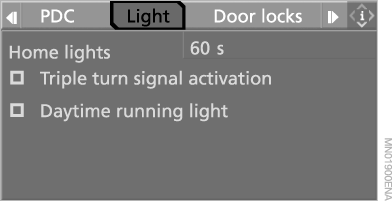
5. Select "Home lights" and press the controller.
6. Turn the controller to set the duration.
7. Press the controller to confirm the setting.
If the driver's door is opened after the ignition key is turned to position 0 without first switching off the lights, a short audible signal sounds to remind you.
A message also appears on the Control Display.
Permanent low beams
If desired, the light switch can be left in position 3.
Observe legal requirements governing the use of permanent low beams.
Parking lamps are switched on in the usual way, see section "Parking Lamps".
The Daytime Running Lights pattern is programmed:
1. Open the home screen.
2. Press the controller to go to the menu .
3. Select "Vehicle settings" and press the controller.
4. Select "Light" and press the controller.
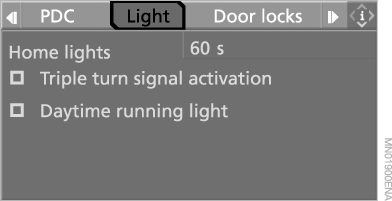
5. Select "Daytime running light" and press the controller.
 The daytime running light circuit is switched on.
Automatic headlamp control
When the switch is in position 1, the low beams switch on and off automatically depending on ambient light (for example, in tunnels, at dusk, or in rain or snow). Adaptive cornering light functions at the same time.
When the low beams are on, an LED next to the symbol illuminates.
 If fog lamps are switched on in addition to the automatically activated low beams, the low beam headlamps do not switch off automatically.
With the ignition key in position 2 and the parking lights switched on, the low beam headlights remain on continuously, even if the light switch is in the AUTO position.◄
The automatic headlight control system cannot judge the ambient light level as well as you can. For example, the sensors cannot detect fog. In such situations, switch on the headlights manually, otherwise driving safety may be compromised.◄
Test yourself
A quick BMW X5 quiz: every answer comes with an explanation and a link to the manual page.