XM Weather
Press the Weather screen button to display the Current or Extended Forecast Weather.
The Extended Forecast Weather screen displays five days of the forecasted weather at the vehicle’s current position.
Press the Location button located near the top leftside of the screen to change the current location to a new location from a list of 156 supported cities. The display will then update the extended forecast for the new chosen location.
Press the Current Weather button located near the bottom leftside of the Extended Forecast Screen to display the current weather at the vehicle’s current position. Weather alerts will also be displayed in the Alerts nearby area. These alerts include Flash Flood Warning, Flood Warning, Special Marine Warning, Tornado Warning, and Thunderstorm Warning.
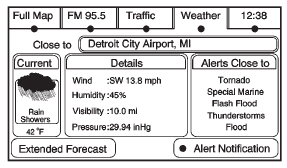
Alert Notification: Press the Alert Notification button located at the bottom rightside of the Current Weather screen turns on or off Weather alert pop-ups. The Weather Alert Pop-up, when turned on, will appear briefly in any audio source, providing alert notification during extreme weather warnings close to the vehicle’s current position.
Test yourself
A quick Cadillac Escalade quiz: every answer comes with an explanation and a link to the manual page.